I had a software-defined radio receiver that was capable of listening across a huge slice of the spectrum, but no project that really showed what it could do. Then I remembered: planes. ADS-B-equipped aircraft broadcast their identity, altitude, speed and—when available—position on 1090 MHz. All I needed was an antenna, a decoder and somewhere for the data to go. This is what happened next.
What ADS-B Actually Is
ADS-B stands for Automatic Dependent Surveillance—Broadcast. It's the system that replaced (or rather supplements) radar as the backbone of modern air traffic control. Every equipped aircraft squawks a tiny radio packet several times a second. That packet contains the flight's ICAO hex code (a unique aircraft ID), GPS coordinates, altitude, ground speed, heading, callsign, and vertical rate. It doesn't encrypt anything. It doesn't authenticate anything. It just broadcasts continuously, to anyone listening.
ATC systems listen with expensive arrays of antennas. I listen with a USB stick and a bit of wire.
The Hardware: SDRplay RSPdx
My SDR of choice is the SDRplay RSPdx — a proper wideband receiver that covers 1 kHz to 2 GHz. It's significantly better than the RTL-SDR dongles most people start with, with lower noise floor and better dynamic range. For ADS-B at 1090 MHz, either would work, but having the RSPdx on hand meant I could just get going rather than waiting for another order to arrive.
The receiver is connected to antennas suited to wideband listening and 1090 MHz work. Even without feeding data to a commercial tracking network, the local receiver quickly sees a steady mix of short-haul flights, long-distance traffic and the occasional unusual aircraft.
Getting dump1090 Running (and the Gotchas That Followed)
dump1090 is the gold standard open-source ADS-B decoder. There's a fork specifically for SDRplay hardware. Installing it sounds simple. It is not.
Gotcha 1: The built-in HTTP server is broken
The SDRplay fork's built-in web server doesn't work. You start dump1090 with what looks like the right flags, point your browser at the expected address, and get nothing. The fix is to use --write-json to output aircraft data to a directory, then serve that directory with a separate Python HTTP server. It's an extra step but once you know that's how it works, it's not a problem.
Gotcha 2: Navigate to /gmap.html
Even with a working HTTP server, the root URL returns a 404. There's no index.html in this fork — you have to navigate directly to /gmap.html. This one is entirely undocumented. I only found it by looking at the source directory.
Gotcha 3: The sdrplay_api service must be running first
The SDRplay hardware requires a background service to manage USB access. If that service isn't running when dump1090 starts, the program exits silently with no error message. Zero output. Just gone. It took me longer than I'd like to admit to figure out the service wasn't running.
Gotcha 4: The right flag is --dev-sdrplay
The flag to tell dump1090 to use SDRplay hardware is --dev-sdrplay. Not --device-type sdrplay, not --sdrplay. Just --dev-sdrplay. Again: not documented anywhere obvious.
spinner[4] array error during compilation, it's a bounds declaration issue in a display helper. One-line patch: change char spinner[4] to char spinner[5] in interactive.c. Then it compiles fine.
The First Detections
Once everything was actually running, aircraft started appearing almost immediately. The first few detections included long-haul traffic, European routes and familiar short-haul operators. That first successful decode was the point where a pile of radio software stopped being infrastructure and became a window into the sky.
There's something genuinely strange about watching a Singapore Airlines flight appearing on your screen when you're sat at a desk. It's not a feed from someone else's data. Your antenna is picking up the radio signal that plane is broadcasting right now, six or eight miles overhead. That hit differently than I expected.
From Decoder to Observatory
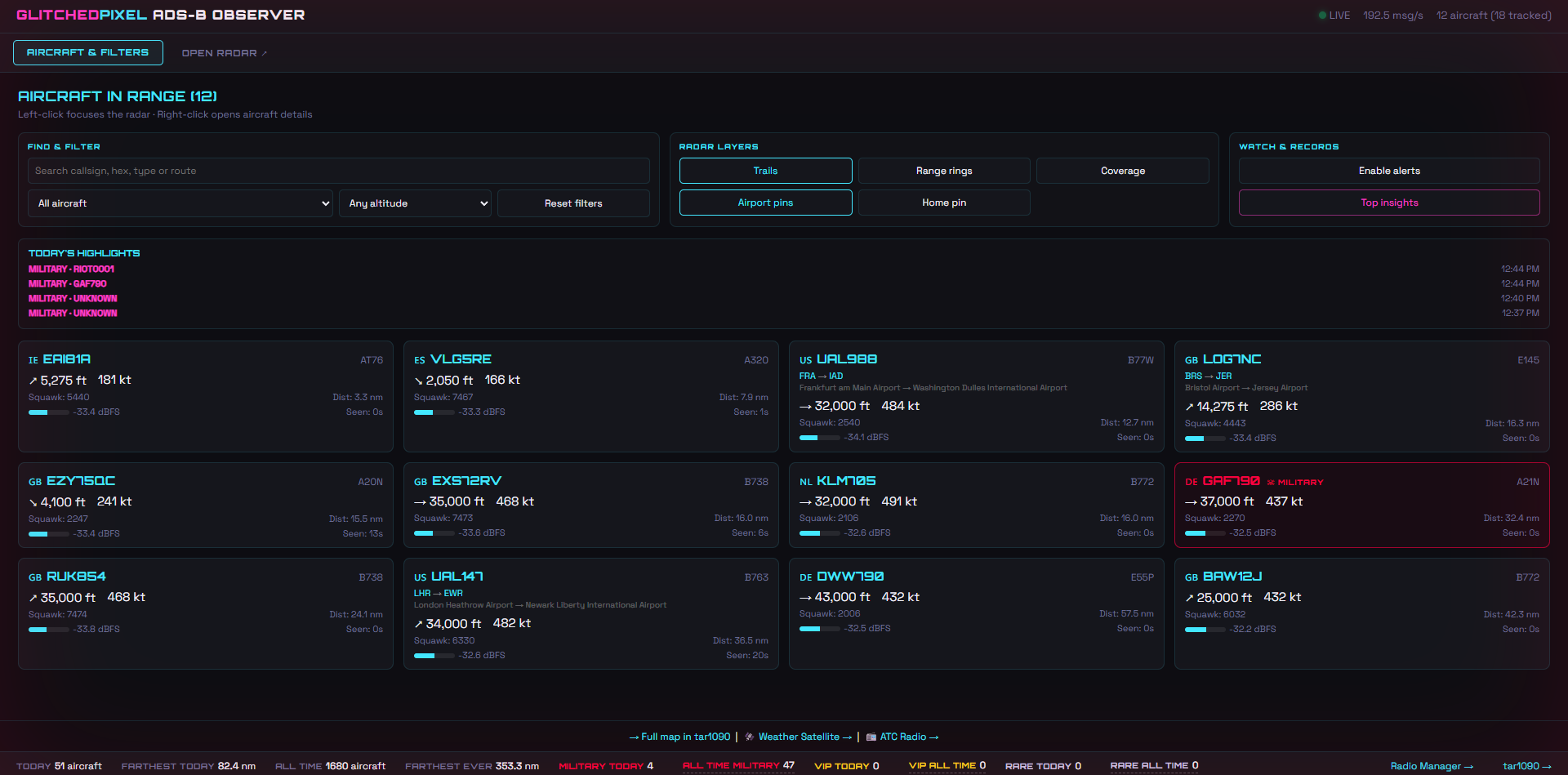
The original map was fine for proving that the receiver worked. It was not enough for the questions that arrived five minutes later: Which aircraft do I see most? How far away was the most distant contact? Which airports appear most often? What flew past while I was asleep? Answering those meant keeping history, and keeping history meant turning the experiment into a proper stack.
The current system is split into focused services:
| Container | Role | Notes |
|---|---|---|
| sdrplay-beast1090 | Radio receiver | Owns the RSPdx and turns 1090 MHz signals into a Beast-format network feed |
| ultrafeeder | Decode + standard map | Runs readsb, tar1090 and graphs1090 as the dependable data engine underneath Pixel Radar |
| flight-logger | Historical writer | Stores positions, sessions, sightings and receiver statistics in InfluxDB |
| radio-manager | Hardware hand-off | Safely yields the shared receiver to other radio workloads and reclaims it afterwards |
| pixel-radar | Observation workspace | The custom radar, aircraft list, insights, alerts, gallery and receiver-health interface |
The radio manager matters because one physical receiver can only do one job at a time. Weather-satellite passes and other experiments can request the hardware, while the manager pauses aircraft reception cleanly and brings it back afterwards. It turns a fragile collection of commands into an actual shared instrument.
Building Pixel Radar: A Dashboard That Actually Looks Right
tar1090 is genuinely impressive software, but it doesn't look like anything else in the home lab. I wanted something that matched the Glitched Pixel aesthetic — dark, cyan, purple, Orbitron headings, the same design language as everything else I've built.
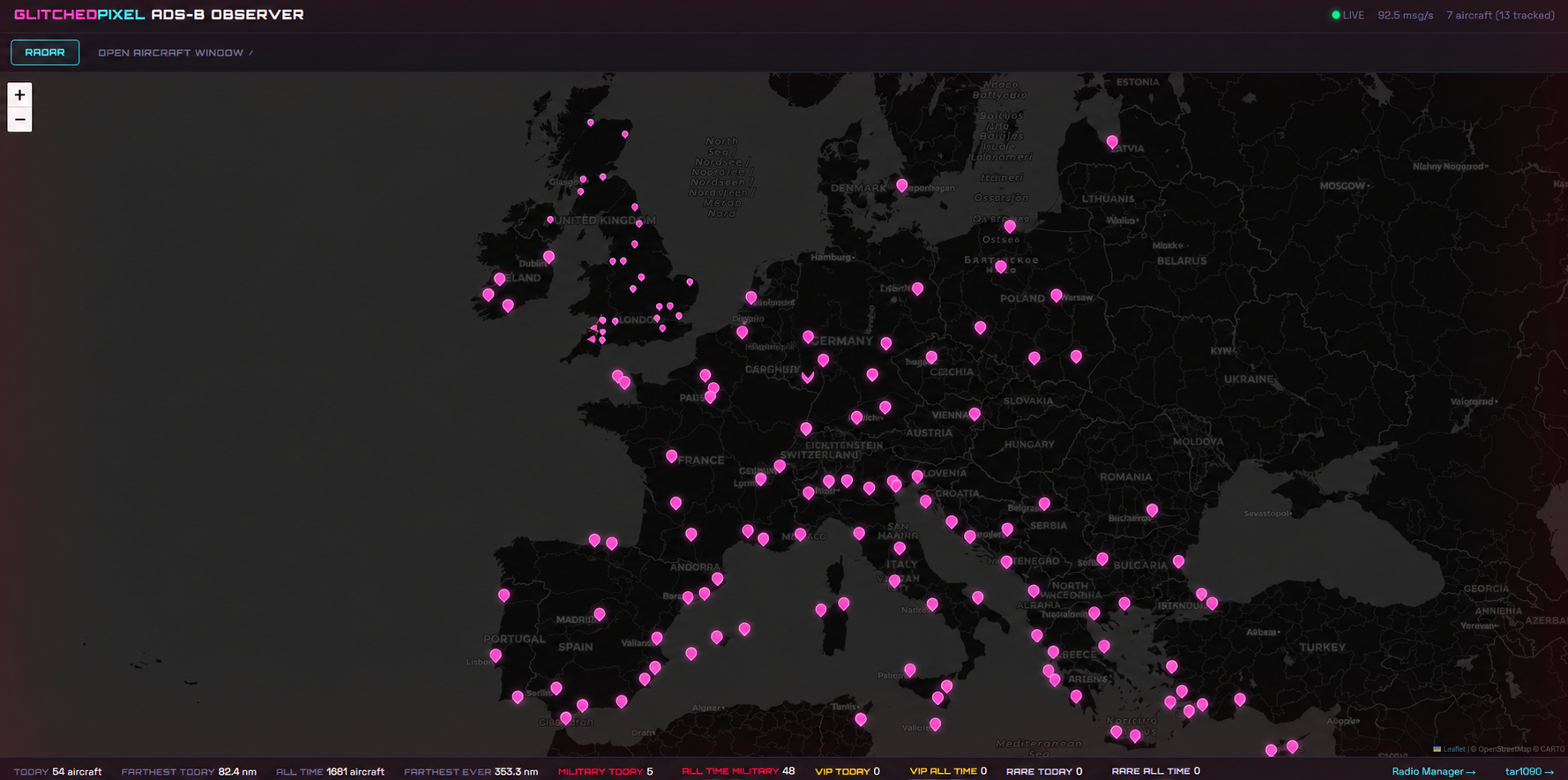
So I built Pixel Radar from scratch: a Flask backend around the live receiver and historical database, then a dark Leaflet interface shaped around the Glitched Pixel visual language. Cyan is live data. Pink is attention. Purple is history. The result looks less like an off-the-shelf map and more like a piece of equipment from Pixel City.
The project now uses two synchronised browser windows. One is the radar. The other is a dedicated aircraft workspace with search, filters, cards, watch controls and records. They communicate through BroadcastChannel: click an aircraft card and the radar focuses it; click a marker and the matching card is selected.
Every Contact Has a Story
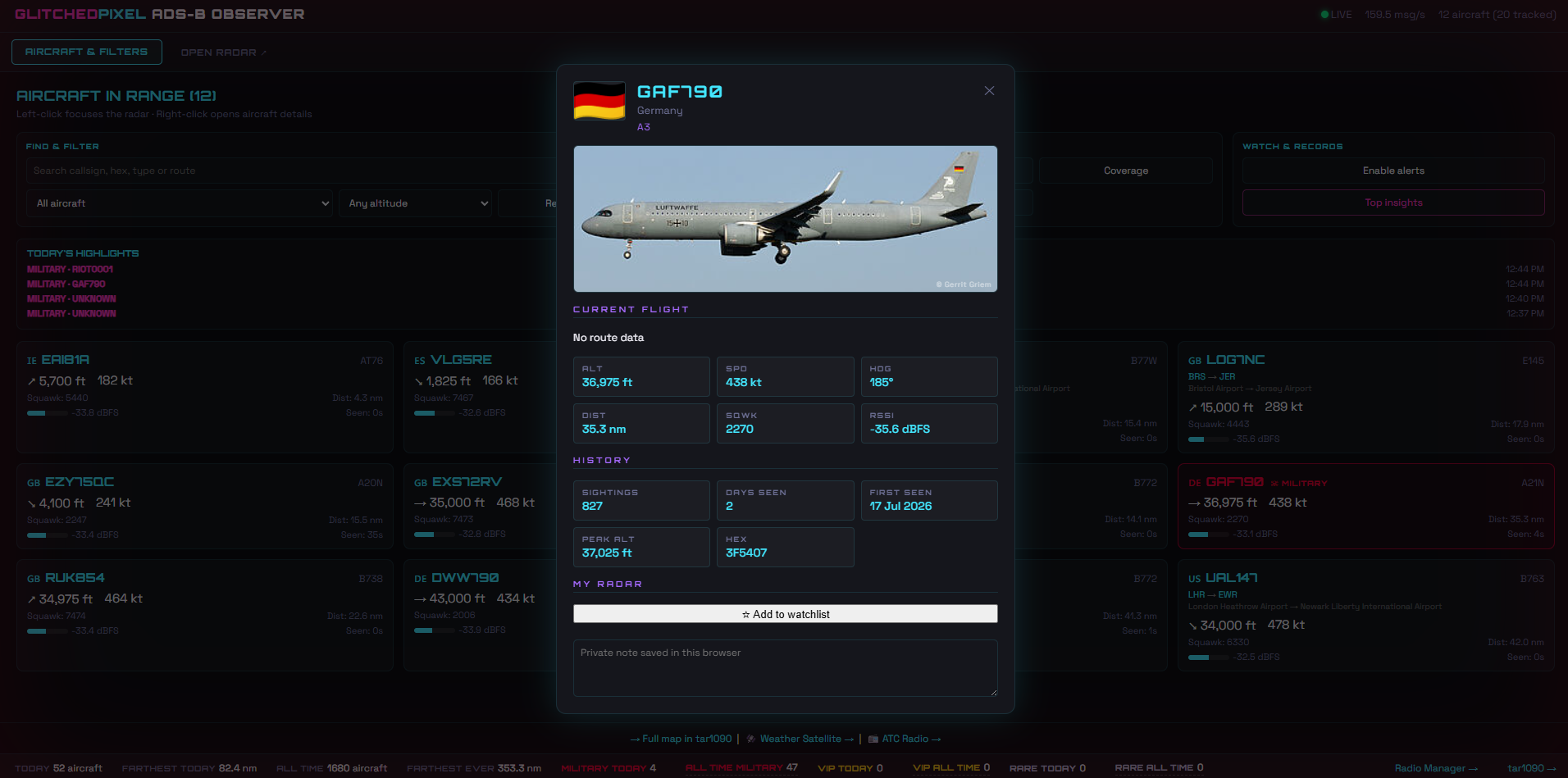
Right-clicking an aircraft opens a detailed record rather than another generic map popup. It combines the current contact—altitude, speed, heading, distance, squawk and signal strength—with the history accumulated by this receiver. It can show how many times the aircraft has been seen, the first day it appeared, its highest recorded altitude, and any private note or watchlist status.
Trails Without the Expected History Files
One upgrade uncovered a classic self-hosting problem: the current ultrafeeder image no longer produced the history_*.json files the first trail implementation expected. The map still worked, but the trails silently disappeared.
The better fix was already sitting in the stack. The flight logger had been storing positions in InfluxDB all along, so Pixel Radar now asks the database for the last 5, 15 or 30 minutes instead. During testing it returned 41 drawable trails and more than 1,300 stored points. The history is now independent of a convenience file that may vanish in a future container update.
The same data powers a reception-density coverage layer, airport pins, remembered map state and a Top Insights panel for the most-seen, farthest, highest and fastest contacts across several time ranges.
The Military Gallery
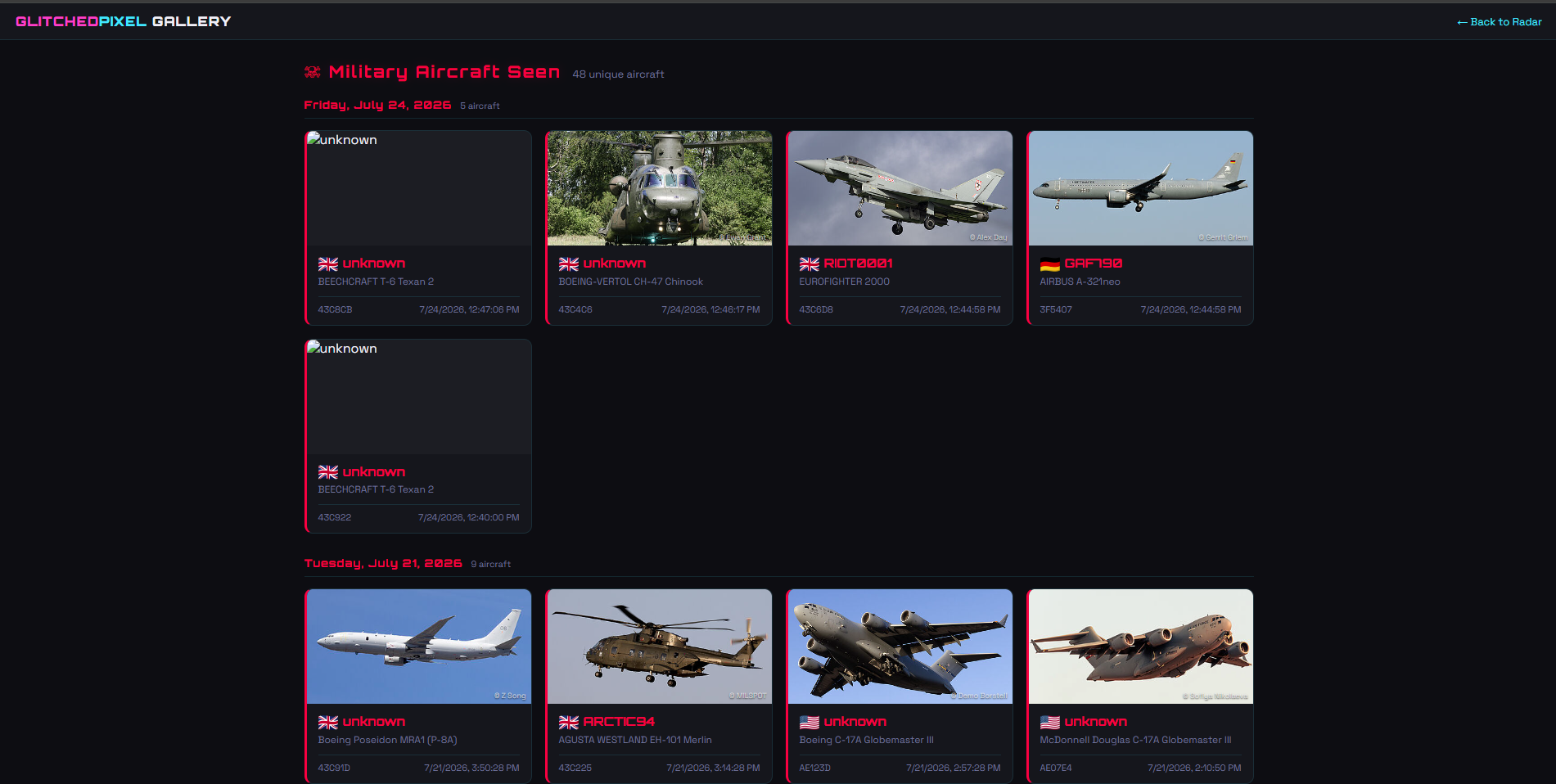
Military, VIP and rare aircraft get special treatment when they openly broadcast ADS-B. Important contacts can trigger an in-app alert, appear in Today's Highlights and enter a visual sightings gallery. The system does not reveal anything secret: it only displays public radio broadcasts received locally, and aircraft that are not transmitting simply do not appear.
The Receiver Broke—Then the System Got Better
The most useful improvement began as a fault. After the RSPdx was reconnected, Linux assigned it a different USB device number. Docker was still mapped to the old numbered path, so every dashboard looked healthy while no fresh aircraft arrived.
The repair was to stop treating a temporary USB number as permanent infrastructure. The receiver container now sees the USB bus it needs, waits for the RSPdx to appear, and avoids competing with an inactive host radio service. A clickable LIVE indicator opens a health drawer with feeder state, data age, aircraft counts, message activity and uptime, making the next silent receiver failure much easier to diagnose.
Privacy by Design
The receiver and dashboard remain private. Public screenshots are selected to avoid publishing the home marker, precise receiver centre, internal addresses, ports or deployment details. The interesting part is the aircraft data and the system design—not turning a project page into a map of the network behind it.
Long term, the historical data can answer increasingly interesting questions: recurring aircraft, changing route patterns, seasonal traffic, unusual contacts and how reception changes with antennas or weather. That is what transformed this from a one-evening radio experiment into one of the home lab's flagship builds.